
 Overview
 What's new
 How to Use
 Step by step
 Video tutorials
 Technical Questions
 License Questions
 Recent Questions
 Demos
Demos Bulgy
Bulgy Magnetic
 Fair (RTL mode)
 Push Tall (responsive)
 More demos
 Download
 Contact
Horizontal css-only menu with rounded corners!
Simplicity and style of a rounded corner menu will make your website stand out from the crowd, in good way!
 FREE download
 More demos
CSS3 Rounded Corners
One of the most famous CSS3 properties is border-radius. Web designers will no longer have to resort to complex table structures using custom-made corner graphics in order to produce designs with rounded corners. Use CSS3 border-radius to make your corners rounded!
The following code is generated for the border-radius in CSS3Menu:
border-radius:0 0 9px 9px;
-moz-border-radius:0 0 9px 9px;
-webkit-border-radius:0 0 9px 9px;
Here's a snapshot from Firefox showing the rounded corners effect:
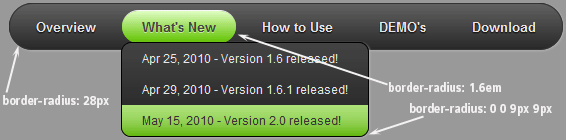
The border-radius is supported by the following browsers: Webkit (from Safari 3+), Opera 10.5, Firefox 3.5.
See also:
CSS3 Rounded Corners, CSS3 Shadow, CSS3 Animation, CSS3 Text Shadow, CSS3 Gradient, CSS3 Transition
Download
CSS3 Rounded Corners Generator
Rectangular shapes are boring. Since the onset of graphical interfaces, computer programmers have been obsessing over producing perfectly rounded corners on screen without applying excessive amount of strain on the computer’s memory. People have not faced that problem for a couple of decades now, with all sorts of software showing off smooth, rounded edges on various objects, but it took several years to roll out the same functionality for Internet browsers.
You would be surprised how much something as simple as rounded corners on buttons can change the Internet users’ perception of a site. The navigation menu is one of the first things people glance at when they visit a website, and that impression both consciously and unconsciously influences their further decisions. Smooth, rounded corners convey friendliness and accessibility, which is very important if you want to keep your new visitors from leaving your site.
A popular way of acquiring rounded corners for buttons and other website elements was by the use of images. It gave web designers full control of how these objects would look on the website and modify their appearance with the highest precision, down to a single pixel. It was also a clumsy way of handling it, used mainly because there was no decent alternative to that approach. There is an alternative now.
CSS3 Menu rounded corners generator allows a wide range of customizable functions apart from its main purpose. For example, it allows the radius of every corner to be set separately from others, resulting in a different radius at each side of the rectangle. Apart from the obvious color and border width settings, it is possible to add additional effects to it like to any other CSS3 object, starting from a simple shadow and ending with animation.
Your website’s navigation menu will benefit greatly from adding rounded corners to its buttons, sub-menus and sections. Unfortunately, trying to find the right settings through CSS code alone, even if you know it well, can be bothersome. You can turn to several online resources, which allow you to preview the rounded corner generator results with different settings, or use advanced software that takes care of every function included in CSS3 and costs a fortune.
However, to build a stable and polished navigation bar that your visitors will enjoy using, it is best to use free software like CSS3 Menu, developed specifically to quickly and efficiently find the most suitable effects for your navigation menu.
The good news is that you will never have to use pictures for this purpose. Instead of clogging up your server with pointless image files that exist only for the reason of resembling shapes to be later occupied by text, you will have direct access to CSS3 Menu rounded corners generator and be able to make necessary adjustments to your buttons at any time you want.
A friendly looking and effective navigation menu, coupled with the simplicity and style of a rounded corner generator will make your website stand out from the crowd, in good way!
Download
Recent Templates

FAQ
- June 23, 2014 How can i setup css horizontal menu mega menu bar?
Hi, Currently I'm using version 5.2, how can i setup mega menu bar? thank you
- June 23, 2014 Move the horizontal menu css to another pc
Hello, we have purchased a unlimted license but now I have a new pc I want to move to. How can I move my app?
- May 06, 2014 Auto-renewal css3 menu horizontal
I was about to purchase this, but I see a "auto-renewal for this order” option. Does the license for this expire? Is it not a one-time purchase?
- April 02, 2014 Developer identification in horizontal menu bar css
Hello CSS3 Menu team, How are you? Hope you are doing well. While I was trying to download and install the software I got an error message has something to do with software developer identification.
- February 13, 2014 Active item in horizontal menu html
Hi, I am experimenting with your software, and don't see any way to show a certain menu selection is active on a page. What I want, is when I click on a menu button, I want to highlight that the button is selected.
- October 26, 2013 Menu css3 horizontal won't work correctly
We still require your assistance to make this work. The drop down is working with Google chrome and not with IE. I am sending you the different screens for you to look at. I understand there are additional code to enter.
- October 26, 2013 Install html horizontal menu into two machines
Hi, I recently bought your app. (Unlimited websites license) and I'm very pleased with it. I have a question. I have Mac and want to install the app. into it too. Does my license allows it?
- October 25, 2013 Css3 horizontal menu and IE issue
I built a menu for a new website... The menu works perfectly in Chrome and Firefox but in IE there is no rounded corners and the sizing looks wrong. When I view the site locally (not on the server), it displays correctly in IE.
- October 25, 2013 Horizontal drop down menu css license
Hi, if I buy the license for $79 or $59 will the license last for a lifetime or only for a year? Thanks.
- October 24, 2013 Upload html menu horizontal folders on the server
Hello, support! Please answer the question as to do I need to also paste the "style.css" and if so, where and how?
- October 22, 2013 Horizontal and vertical css mega menu
Does your menu creation program support both horizontal and vertical menus - using the same menu style?
- October 22, 2013 Css horizontal drop down menu on iPad
I want to to use CSS3Menu on my site. But before I purchase it I'd like to know whether it works on iPad?
- October 21, 2013 Text alignment in horizontal drop down menu
I have created the menu, but I'd like to change the text alignment in the submenu. Where I can do that?
- October 17, 2013 Change horizontal css menu the hover color from green to red
I'm using the Mac - Dark Green theme and I want to change the hover color from green to red. When I put in the red color code it looks like crap, not like the crisp nice green color.
- October 15, 2013 Can the menu css horizontal sub menus be centered?
First let me say thank you for providing this product free for not-for-profit use. That is very generous and this is a great product. I can tell you spent a lot of time to make it easy to use.