
 Overview
 What's new
 How to Use
 Step by step
 Video tutorials
 Technical Questions
 License Questions
 Recent Questions
 Demos
Demos Bulgy
Bulgy Magnetic
 Fair (RTL mode)
 Push Tall (responsive)
 More demos
 Download
 Contact
Pure HTML5 menus with CSS3 Gradient!
Integration of CSS3 gradient background within a navigation bar will increase its appeal to the visiting Internet users, make it look sleek and polished.
 FREE download
 More demos
CSS3 Gradient
Gradients are some of the best effects you can add to informational websites, as they are not distracting. You can add gradients for Safari, Chrome, and Firefox; this will cover over half of your visitors for some kinds of sites.
Here's a snapshot from Firefox showing the CSS3 Gradients:
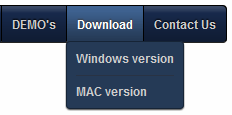
The syntax for CSS3 Linear Gradients differs between the Firefox and Safari/Chrome version.
Firefox Linear gradients:
-moz-linear-gradient(<point> || <angle>, color-stops)
Safari, Chrome Linear gradients
-webkit-gradient(linear, <point>, color-stops )
* Point or angle: This is used to define the starting point of the gradient. The value can be a percentage (%), in pixels, or "left", "center", or "right" for horizontal and "top", "center", or "bottom" for vertical positioning. If a horizontal or vertical position is not specified, the value defaults to "center", or 50%. In Firefox, angle values are also accepted, such as 45deg.
* color-stops: Colors in which the gradient should transition to and from. If more than two colors are specified with no explicit stop value for each color, the gradient will transition from one to the next evenly until the final stopping color.
- In Firefox, each color stop follows the syntax: <color> [ <percentage> | <length> ]. If a percentage (0 to 100%) or length value (0 to 1.0) is defined following the color name, the previous color will fade to that stop color at that stop point. If no value is present, the color will be fade out gradually from the start color to the end color.
- In Safari, each color stop follows the syntax: color-stop(value, color). Stop value is either a percentage (0 to 100%) or length value (0 to 1.0), or from(color) and to(color). The later two are shorthand functions equivalent to color-stop(0, color) and color-stop(1.0, color).
The following code is generated for the CSS3 gradient in CSS3Menu:
background-image: -moz-linear-gradient(50% 0%,rgba(255,255,255,0.38),rgba(255,255,255,0.16));
background-image: -webkit-gradient(linear,50% 0%,50% 100%, from(rgba(255,255,255,0.38)), to(rgba(255,255,255,0.16)));
CSS Gradients are supported by FF3.6+, Opera 10.50, Safari 2+ and Google Chrome.
See also:
CSS3 Rounded Corners,
CSS3 Shadow,
CSS3 Animation,
CSS3 Text Shadow,
CSS3 Gradient,
CSS3 Transition
Download
CSS3 Gradient Colors on Objects and Backgrounds with CSS3 Menu
Solid color tones are gradually weeded out from the web as they are becoming old-fashioned in the eyes of Internet users. While world-renowned online resources like Wikipedia with their minimalistic design style can still pull it off, most other websites must fight for their visitors’ attention with any means necessary.
CSS3, the latest version of website-enriching coding language that focuses on style and design features, supports gradient colors, which can be added to different objects and page elements or function as backgrounds. Everything is already built into the code and compatible with most versions of latest Internet browsers, such as Internet Explorer, Firefox and Opera.
This is a major innovation on part of CSS3 developers, as previously web designers were forced to use images to replicate the effect of gradient colors on their sites. Buttons and sections of the website were pre-made in image editing software like Photoshop. The same went for backgrounds, only they were grouped in tiles or stretched across the whole screen, resulting in a somewhat clumsy likeness of a full-fledged gradient color. Alternatively, web developers created one large gradient background to occupy the whole screen, resulting in a relatively small, but unnecessary increase in load time for site visitors and webmasters’ traffic costs.
While some of them were able to achieve good results with these techniques, others were not as lucky or skilled. Fortunately, everything changed with the introduction of CSS3 gradient feature. It allows fully customizable and scalable gradient areas to be placed within the website and later layered, combined or otherwise adjusted for your individual needs and vision.
CSS3 gradient in web menu will increase its appeal to the visitors, make it look sleek and polished. If you browse the Internet’s most visited sites for a moment, you will see that they all employ such techniques for their navigation menus and individual buttons. Gradients convey the look of the future and even if your site will not be praised by its excellent use of gradients, not using them will make it look dated.
The only downside is that it is hard to get the right gradients with CSS code alone and professional web development software is too expensive if all you need to do is create a unique navigation bar for your website. Even the free web resources that preview different combinations of gradient colors are not of much use, because they cannot be used in combination will all other elements you have planned for your navigation menu.
This is where CSS3 Menu steps in. Website owners who know exactly what they need and have a basic understanding of style and design will find this free software very easy to work with and create unique and versatile navigation menus from scratch in less than a hour, available to be published on their website immediately.
Even if you are not sure if CSS3 gradients are right for your website, CSS3 Menu allows you to compare it to other color styles without wasting much time.
Download
Recent Templates
FAQ
- June 23, 2014 Another menu covers the html5 nav
Hi, I created 2 menus on 1 page. One menu is a dropdown and the other is horizontal across the top of the page below the logo. The problem is that the first menu go behind the horizontal menu.
- April 24, 2014 Update html5 css3 menu on site
If I make updates to the menu and hit save does it automatically update on my website? Do I have to re-insert it into a page?
- April 23, 2014 Transfer created menu css3 html5 from Windows to Mac
I would like to use my macbook pro to learn and create the menu then transfer to finished menu to the windows 7 PC, is this possible or do I need to create two menus, 1 for windows PC and 1 for the mac?
- April 17, 2014 Upgrade single drop down menu html5 license to unlimited
I purchased the single website license. If in the future I need to upgrade to Unlimited website license, will I have to pay the whole amount? Thank you!
- April 17, 2014 Difference between html5 menu example Single Website and Unlimited Websites licenses
Hi, I've tried the Free version and it looks perfect. I'm not sure what license I need to buy now. Could you write what is difference between Single Website and Unlimited Websites licenses? Thanks.
- April 16, 2014 Create accordion menu with html5 menu tag
I have purchased the enterprise version and was wondering if there is a template for an accordion type menu so that I can keep everything compact on the left side of the screen.
- March 19, 2014 Dynamical html5 navigation menu
I have a question for you. Is the menu dynamically fed via the CMS?
- November 26, 2013 Two lines of text in menu html5 css3
Hi, support! Is it possible to make menu button text display on two separate lines. For example.
- October 24, 2013 Basic links instead of html5 menu bar
Hi, All I am trying to do is put it in a web HTML snippet and publish. You won't believe I've been attempting for hours on end for 2 days with no success. I just get the basic links. after i click apply.
- October 23, 2013 The lightbox doesn't cover html5 dropdown menu
The first issue is related to use with CSS3 Menu. When I open a lightbox gallery on the same page as a CSS3 Menu navigation item the navigation seems to become part of the same layer as the lightbox.
- October 21, 2013 Html5 drop down menu and iframe
I just found you website and downloaded the free Version for non-commercial sites. Like the Android drop down. I tried it with this one, but it doesn't work. Is it possible to use it in a frame?
- October 15, 2013 Menu html5 fails on start
Does css3menu work with windows 7 ultimate x64 platform, if so, it is not running on mine, what are possible problems, my machine runs perfectly as I am a computer consultant/web designer.
- October 14, 2013 Upgrade Single License html5 menu to Unlimited Websites
I purchased the CSS3Menu single license a couple months ago but would like to upgrade to the business license for multiple sites. Is there a way I can just pay the difference and get the upgrade?
- October 09, 2013 Add html5 css3 menu on the page
Hello, support. How do you export to use within iWeb? What is the code - how do I bring the file into iWeb? Thanks!
- October 09, 2013 Add menu css3 html5 on page
I’d like to try using your CCS3 Menu template on some websites but, having mostly created them in dreamweaver by creating templates and attach pages to the templates...